Privileged access
Membership and account configurations that require privilege review.
LOCAL ACTIVE DIRECTORY SECURITY ASSESSMENT
ADRiskInsight helps administrators, consultants and MSPs review common Active Directory security risks, inspect supporting evidence and export practical reports—without deploying agents or uploading assessment data to the cloud.
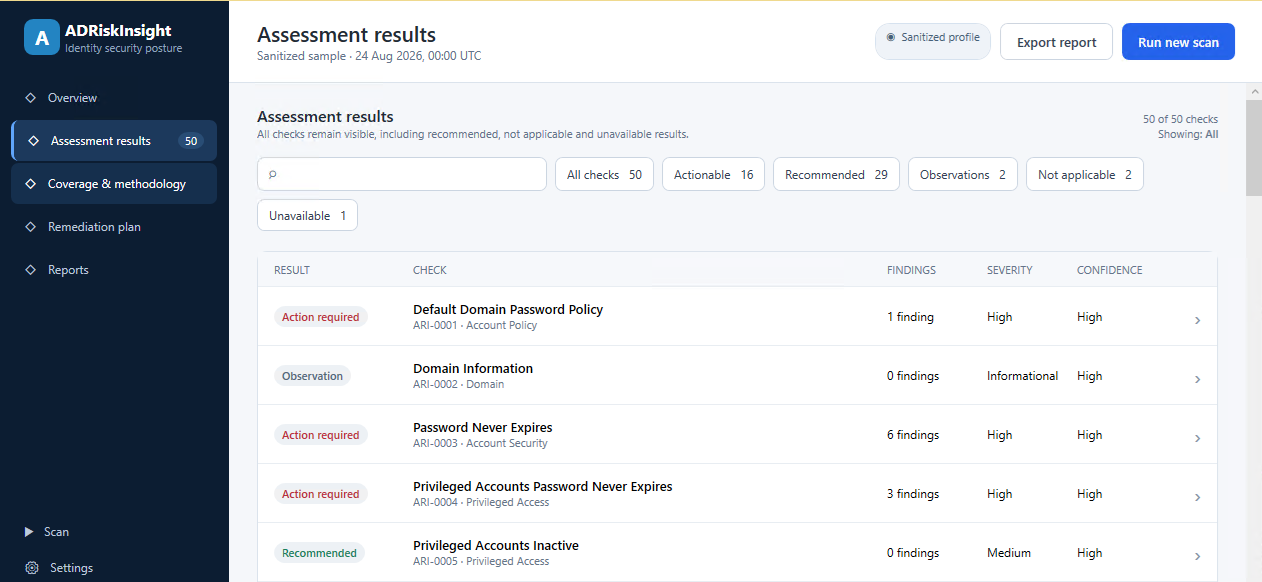
Demonstration data · Interface and assessment catalog continue to evolve
Findings, coverage and confidence stay separate—so a technical error never looks like a safe result.
REVIEW AREAS
The assessment combines directory observations with local-configuration checks on the selected domain controller.
Membership and account configurations that require privilege review.
Policies, risky attributes, stale accounts and objects that need context.
Legacy or weak configurations related to Kerberos, LDAP and NTLM.
Effective local-host configuration and controls applicable to the DC role.
Affected objects, technical context, available guidance and reviewed sources.
Visible limitations that prevent conclusions broader than the evidence.
THE METHOD
Every result keeps execution, applicability, assessment, severity and confidence separate. The reader can trace a conclusion back to evidence and forward to the recommended action.
Collect technical state inside the authorized scope.
Separate exposure, context, coverage and items needing review.
Prioritize with remediation, precautions and validation available.
TWO SURFACES · ONE ASSESSMENT SNAPSHOT
Navigable, filterable, printable and usable offline. No remote scripts, styles, fonts or images.
Summary, results, remediation plan, sources and technical evidence in an operational format.
NOTE / Technical reports may contain environment identifiers. Review and handle them according to the organization's security policy.
Explore the sample report →CLEAR PRODUCT BOUNDARIES
The assessment and reports are generated on the authorized domain controller. Assessment data is not uploaded to the cloud.
Online activation communicates only with the licensing service. An offline licensing flow is also available for restricted environments.
ADRiskInsight identifies, explains and helps prioritize. It does not automatically repair or modify Active Directory.
BEFORE YOU RUN
The assessment combines directory information with effective configuration from the selected controller. Coverage depends on the execution point and available access.
Run the application directly on one authorized domain controller. A single execution queries the available directory scope and that DC's local sources.
Use an approved Windows account with access to the required directory and configuration sources. Missing access remains visible as incomplete coverage or an execution error.
The assessment does not upload its data to the cloud. Online activation is limited to the licensing service; restricted environments can use the offline flow.
Choose an organization-approved writable location for the self-contained HTML report or structured Excel workbook.
VISIBLE PRICING · FIXED TERM
Each plan provides access for the full term shown; the price is not tied to a single scan.
A straightforward download
Review the plans and download the installer without completing a lengthy sales form or scheduling a call. At purchase, we ask only for the information needed to process payment, deliver the license and meet applicable obligations.
One month of access for assessment and follow-up validation
A three-month window for assessment, remediation follow-up and reassessment
Year-round access for recurring assessments and ongoing validation
USD · one payment for the term · no automatic renewal
Secure checkout processed by Paddle · Sandbox during this validation
Refund requests within 14 calendar days
TWO WAYS TO PUT IT TO WORK
Establish a repeatable posture review across infrastructure and security.
Deliver professional work whose reasoning the client can inspect.
FREQUENTLY ASKED QUESTIONS
No. It assesses and reports. Any remediation remains under the control of authorized administrators.
Directly on one authorized domain controller. Directory queries cover the available scope, while local checks describe the selected DC; it does not need to be installed on every controller.
The assessment and report generation do not upload assessment data. Online activation communicates with the licensing service, and an offline flow is available for restricted networks.
A navigable, printable, self-contained HTML report and a structured Excel workbook generated from the same assessment snapshot.
Yes. Before opening checkout, the buyer can ask Paddle to collect company information and a supported Tax ID or VAT ID. Paddle validates and uses those details as applicable for tax treatment and transaction documentation. The outcome and document format depend on country, validation and Paddle's rules.
ADRiskInsight withholds it when methodology coverage or execution quality cannot support a defensible conclusion. Results and limitations remain visible.
No. The planned periods are fixed term and end when the purchased time expires unless the customer explicitly buys another term.
Run ADRiskInsight directly on one authorized domain controller. A single execution assesses the available directory scope, while local-configuration checks describe the selected DC; there is no need to install it across every domain controller.